iOS 7

iOS 7 is a major upgrade of the mobile OS for iPhones and iPads.

As Apple always focus on providing a great user experience over support for older models, the introduction of iOS 7 leaves behind a few devices.

iOS can only be upgraded on the following devices

  • iPhone 4
  • iPhone 4S
  • iPhone 5
  • iPad 2
  • iPad 3rd Generation
  • iPad 4th Generation
  • iPad Mini
  • iPod Touch 5th Generation

For the early adopters of the iPad, sorry but it’s time to upgrade. I do have the first version of the iPad and it’s running the most up to date iOS 5.1.1.  It’s still in daily use although it feels a bit sluggish compared to my iPhone 5 running iOS 6.

iPhone 4 users can upgrade to the latest iOS 7 but I’m going to leave my old iPhone 4 on iOS 6. Some people have reported that the user interface is a bit slow.

The iOS 6 is still quite good with notification center over the iOS 5. However closing apps is a chore as you have to hold the icon down for a few seconds to close it. Other than that, I would choose to have the speed over the extra features of iOS 7 on the older iPhone 4.

Although some of the features of the iPhone 5C are nice like the much improved camera, like most people who are locked in a two year mobile contract, I can’t upgrade to the latest.

Updating to iOS 7 feels like getting a new phone and will tide me over till the iPhone 6 is out. If you have the iPhone 4S or 5, do make the upgrade.

The new icons and animation is very beautiful and smooth. I found it fast and it does not feel sluggish on the iPhone 5.

Upgrade Process

1. Update your iTunes to the latest version

2. Backup and sync your iPhone

3. Ensure that purchases done on iPhone are transferred.

4. Download and update to iOS 7 from iTunes.

The iOS 7 is a hefty download at more than 700mb depending on the device. As such, I would recommend updating while connected to the computer instead of over the air.

Apple iPad Camera Connection Kit

The Apple iPad Camera Connection Kit or commonly referred to as the CCK for short in online forums consists of two dongles. It was launched shortly after the 1st iPad was introduced by Steve Jobs in 2010. It originally retailed for USD 29.

The box is quite small and as it was just purchased shortly after the iPad 3 or “new iPad” as officially named by Apple was launched, the box still lists this product as compatible with iPad 1 and iPad 2. However, the iPad Camera Connection Kit does work with the iPad 3.

Inside the box are the two dongles, instructions and a warranty booklet. One dongle has a USB port for connecting to cameras through a USB cable. The other dongle accepts SD memory cards otherwise known as Secured Digital. It is one of the most commonly used type of memory cards in digital cameras.

However, do note that although it supports the higher capacity SDHC (Secured Digital High Capacity) standard, it does not work with the latest SDXC memory cards. If your memory card is 32 gb or less than it should be up to SDHC. Once the capacity is more than 32 gb it will not work with the iPad Camera Connection Kit.

So why would anyone buy this product? Well, the iPad Camera Connection Kit means traveling with less weight on short holidays. Instead of lugging around a laptop weighing around 3kg excluding the other accessories like the power supply, all that is needed is an iPad and the SD card dongle.

Some would say there are lighter notebooks like the MacBook Air which for the 13 inch models even comes built in with an SD card reader reducing the need for additional cables or adaptors which may be easily lost. It is not that much heavier at 1.35 kg but is a lot more powerful and capable than the iPad. But it also runs on flash memory which comes with only 128gb as standard for the base 13 inch model. Sure it has double the storage of a 64gb iPad but it’s also double the weight and bigger in size. If you consider the MacBook Air 11 inch, it also requires an additional USB SD card reader and comes with only 64gb of storage for the base model.

Just for interest, the iPad Camera Connection Kit originally allowed users to plug in many external USB devices such as keyboards and microphones although it was all unofficial and not supported by Apple. It also allowed external drives for storage through jailbreaking the device.  They stopped all this from happening with the introduction of iOS 4.2 by limiting the power output to work with high power devices.

Overall I think it’s a useful accessory for short trips to backup photos. The process is quite seamless as the photo app launches once the dongle is plugged in with the SD card. There is the ability to import all photos or tap to select specific photos to import.

8 reasons to get an iPad instead of iPad 2

Listed below are the 8 reasons I bought an iPad instead of iPad 2.

1. Same resolution and size of LCD screen.

2. Same memory and connectivity options except for new CDMA model.

3. 730g for iPad 3G vs 613g for iPad 2 with 3G. Difference of only 117g or 16% less.

4. iPad is 13.4mm thick vs iPad 2 at 8.8mm but still thinner than MacBook Air’s 17mm or difference of 1.42mm of the Samsung Galaxy Tab at 11.98mm.

5. iPad 2 may be thinner and lighter than the iPad but if you are getting your first tablet, the iPad 2 will also have a slimming effect on your wallet.

6. Sure it’s fun having the latest gadget but it’s a 2 week waiting time for online orders of ipad 2 while I can waltz into a shop to get the iPad immediately.

7. Apple has announced at WWDC 2011 that iOS 5 is supported by the iPad so there’s still support and updates for more features.

8. And the last reason that is more a post justification when a friend commented on my facebook page on my new iPad ‘that’s so 2010, iPad 3 is coming out soon’. The iPad is still great for reading, email, web surfing and more. Technology keeps improving so there’s no point holding out for the next model if the older model serves your needs. More cash in the pocket means I can upgrade to the iPad 3 next year if it’s really compelling.

That’s enough typing for now, back to browsing through the Flipboard app on the iPad.

AutoCad On Mac, iPhone, iPod Touch & iPad

A few months ago, AutoCad for Mac beta was released under a code name called Sledgehammer. This marks the return of AutoCad to the Macintosh platform since the last compatible version at AutoCad R12.

With the proliferation of the iPhone and iPad in the business environment, AutoCad WS was released for the iPhone, iPod Touch and iPad as a free application on 29th September 2010 before the launch of AutoCad for Mac. While Autocad WS is free, AutoCad for Mac will be priced the same as AutoCad 2011 for Windows PC’s.

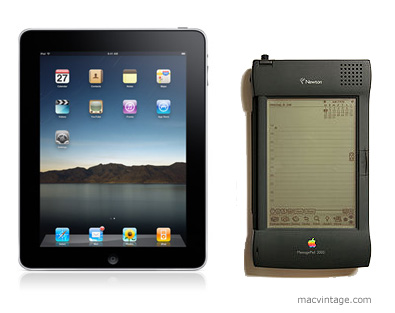
Apple iPad and the Newton MessagePad

Apple first introduced their portable personal computing device with the Newton Original Message Pad or Newton OMP.

The first model was a large PDA and the home screen looks similar to the iPhone. There were rows and columns of applications with the bottom reserved for navigation and built in programs like calander and mail.

The killer feature it had over other PDAs was hand writing recognition. Apple thought the Newton could replace a paper diary and organiser for taking notes in lectures or meetings and managing time.

As it turned out, the handwriting recognition software was not quite ready to hit the market. This was quickly fixed in subsequent models. Apple continued introducing upgraded models including an education model called the eMate which looked like a laptop and ended the line in 1997 with the Newton Messagepad 2100.

In a market with lower cost and smaller devices like the Palm Pilot and the fiaso of the poor handwriting recognition during launch etched in consumer minds, Apple pulled the plug on the Newton with a minority group who love their Newtons petitioning against the decision.

Before the news to discontinue the Newton Messagepad, I was in the midst of moving to a new place. The timing of the move also meant a 6 month stay in a rental apartment before the new place was ready.

My main computing device was an aging 486DX running windows 95. I had seriously considered switching to using a Newton MP 2100. It would take up less space and be easier to move instead of the bulky CRT and CPU.

The Newton was available with the option of an external keyboard for input besides the on screen keyboard and hand writing recognition with a stylus. It could access email and web pages although the screen was monochrome. There were programs for word processing and other applications.

Since I hardly do any gaming, the Newton MP 2100 seemed to be all I needed for a computing device. A device the size of a paperback novel that could almost replace a desktop. Now that’s what I really consider a personal computer.

Many people first compared the Newton to the iPhone and iPod Touch. But we believe it is closer to the iPad.

Through advancement in technology, Apple has in a way brought back the Newton in the form of the iPad. Will the iPad be a success or fade into technology heaven like the Newton?

The key reason we believe it will be a success is because the technology and also consumers are ready for such a product.

Millions of people have used the multitouch interface on the iPhone and iPod Touch and Apple was able to thoroughly improve and test the software implementation. These devices were also at a lower price bracket which was within reach to most consumers. After people are familier with how to use it, they will find it easier to buy and use an iPad.

In the past with the Newton, applications had to be installed from a computer. Today with iTunes and the App Store, the iPad can connect directly to the Internet and download programs and more importantly access the wealth of music, videos and news. It’s this ease of use that will make the iPad ride the wave created by the iPhone and iPod Touch.

Since I already have an iPhone and no iPod Touch, the iPad is on my list of gadgets to buy. In fact, I have already found myself relying more on my iPhone to check emails, facebook and update blogs than on my MacBook. With 9 hours spent almost continually in front of the computer, I just want to chill out on my sofa and watch some TV when I get home. With VNC installed on the iPad it could also access my MacBook to do stuff that the iPad can not handle all from the comfort of my couch.

Got to start saving up for the iPad.

Moving to a new home

At present, all the Macs are scattered everyone. A few of them are displayed on a shelf while the rest are tucked in the store room and around the house.

The metal framing of the shelf was bought from ikea and the timber shelves salvaged from a shop that closed down.

As we are moving to a new place, it’s time to create a nicer display and work area. New white laminated timber shelves have been ordered and there’s now a small room approximately 1.5m x 2.8m to display the collection. 

(Photo Coming Soon…)

Behind the frosted glass is the kitchen. Initially we wanted to have it as clear glass so the Macs were viewed from the kitchen. But knowing that it might get pretty messy at times with Macs taken apart for repairs we decided to keep the glass frosted so that all the mess is contained within the room.

The frost is just a sticker and we intend to remove the frosted sticker over the little window on the right to place an LCD monitor for viewing recipes and catching up on the news or weather from the kitchen. Now if only I could find a cheap Apple Cinema Display.

(Photo Coming Soon…)

While the renovation works are going on, the Macs have been stored in the guest room. The wardrobe is filled with Macs. There’s the two Twentieth Anniversary Macintosh.