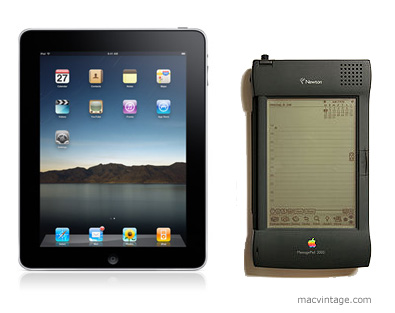
Apple iPad and the Newton MessagePad

Apple first introduced their portable personal computing device with the Newton Original Message Pad or Newton OMP.

The first model was a large PDA and the home screen looks similar to the iPhone. There were rows and columns of applications with the bottom reserved for navigation and built in programs like calander and mail.

The killer feature it had over other PDAs was hand writing recognition. Apple thought the Newton could replace a paper diary and organiser for taking notes in lectures or meetings and managing time.

As it turned out, the handwriting recognition software was not quite ready to hit the market. This was quickly fixed in subsequent models. Apple continued introducing upgraded models including an education model called the eMate which looked like a laptop and ended the line in 1997 with the Newton Messagepad 2100.

In a market with lower cost and smaller devices like the Palm Pilot and the fiaso of the poor handwriting recognition during launch etched in consumer minds, Apple pulled the plug on the Newton with a minority group who love their Newtons petitioning against the decision.

Before the news to discontinue the Newton Messagepad, I was in the midst of moving to a new place. The timing of the move also meant a 6 month stay in a rental apartment before the new place was ready.

My main computing device was an aging 486DX running windows 95. I had seriously considered switching to using a Newton MP 2100. It would take up less space and be easier to move instead of the bulky CRT and CPU.

The Newton was available with the option of an external keyboard for input besides the on screen keyboard and hand writing recognition with a stylus. It could access email and web pages although the screen was monochrome. There were programs for word processing and other applications.

Since I hardly do any gaming, the Newton MP 2100 seemed to be all I needed for a computing device. A device the size of a paperback novel that could almost replace a desktop. Now that’s what I really consider a personal computer.

Many people first compared the Newton to the iPhone and iPod Touch. But we believe it is closer to the iPad.

Through advancement in technology, Apple has in a way brought back the Newton in the form of the iPad. Will the iPad be a success or fade into technology heaven like the Newton?

The key reason we believe it will be a success is because the technology and also consumers are ready for such a product.

Millions of people have used the multitouch interface on the iPhone and iPod Touch and Apple was able to thoroughly improve and test the software implementation. These devices were also at a lower price bracket which was within reach to most consumers. After people are familier with how to use it, they will find it easier to buy and use an iPad.

In the past with the Newton, applications had to be installed from a computer. Today with iTunes and the App Store, the iPad can connect directly to the Internet and download programs and more importantly access the wealth of music, videos and news. It’s this ease of use that will make the iPad ride the wave created by the iPhone and iPod Touch.

Since I already have an iPhone and no iPod Touch, the iPad is on my list of gadgets to buy. In fact, I have already found myself relying more on my iPhone to check emails, facebook and update blogs than on my MacBook. With 9 hours spent almost continually in front of the computer, I just want to chill out on my sofa and watch some TV when I get home. With VNC installed on the iPad it could also access my MacBook to do stuff that the iPad can not handle all from the comfort of my couch.

Got to start saving up for the iPad.

Apple Lisa

Two years ago, an Apple Lisa 2 that could not be powered on was listed on eBay.

As it was located in Sydney and not halfway across the globe in USA, a frantic bidding war broke out during the last few minutes and we won the auction for the Apple Lisa 2.

The seller dropped off the Apple Lisa 2 with someone I knew in Sydney to save on the shipping cost. It has been sitting wrapped up in storage for the last 2 years until today where it was packed and awaiting the freight company to pick it up.

Can’t wait to finally see it after such a long wait.

iPhone TomTom GPS App (Singapore & Malaysia)

The prices for a dedicated GPS have dropped over time and it is now possible to buy it for as low as $300 dollars.

I’ve always wanted to get one but felt that it would not be fully utilised. After all, in little sunny Singapore it’s almost impossible to get lost. Just keep heading straight and you’ll come across a sign directing to one of the expressways.

Over the long Christmas and New Year break, we decided to cross the borders for a short get away to Malacca in Malaysia. So instead of buying a map, I finally pulled the trigger to get a GPS. Since I already have an iPhone 3G with a built in GPS, the cheapest route was to purchase a GPS navigation app.

There are a few GPS apps available on the iTunes app store by TomTom, Sygic and Ndrive. The reviews I read on other blogs about these apps compared showed that Sygic included maps of Singapore, Malaysia and even Thailand while TomTom only included maps of Singapore and Malaysia.

So from a cost to value ratio, the Sygic app seems the better choice. However, since I don’t think I will be driving up to Thailand, I decided to get the TomTom app. The current version is 1.2 and people who bought the earlier 1.0 version have been getting free updates. I’m not sure if map updates will be free as the software update seems to be for resolving bugs and improving certain features.

After buying the TomTom GPS app, I found that it included maps of Brunei. In fact after my holiday and a bit more post purchase research, the Sygic app actually includes maps of Indonesia and Brunei too. That’s a total of 5 countries.

Before setting off for Malacca, the iphone was placed in a cradle on the dashboard of the car and it quickly located the GPS signal and locked on to my current location. I then added my home address into the app for quick future navigation home.

Next, the navigation icon was selected and the Malaysia map was selected. I typed in Malacca and it prompted for the street. ‘Tun’ was entered and the correct street ‘ Jalan Tun Tan Cheng Lok’ together with a few other street names was listed. I selected the correct street name and it quickly analysed and found the correct route.

It did prompt that toll road would have to be used as the crossing over the boarder requires a fee. The ‘use toll roads’ was selected and off we go.

Navigation was clear as it indicated the number of meters to the next turn. The voice prompt also guides the drive to switch lanes early in preparation of the next exit.

However, we quickly hit a small problem. Shortly after crossing the causeway, the GPS indicated the correct way to hit the North South highway was to go straight. At that junction, the road ahead had been blocked off with temporary barricades with a detour sign directing traffic to the left.

We followed the road signs but the GPS kept prompting to make a u-turn when possible. After following the road signs for another few minutes, the GPS finally recalculated the route and guided us to the North South highway correctly. Actually, at this point of time, no GPS was really necessary as the road signs were quite clear.

During the rest of the trip, the GPS worked properly and we did not encounter any further differences between the GPS map and the actual roads. The battery on the iPhone 3G ran low after about 3 hours. However, it has to be noted that the iPhone 3G was already more than a year old. A car kit with a charger is a must for longer drives like this.

For places like Malaysia with different states, it is logical for finding the address or street where you are heading starting with country, state and then the street name. However, for places like Singapore, it is difficult for to enter the name of the town. After all, Singapore is a small country and most people refer directly to the street name and not the town where the street is located. It would be great if we could easily search for the street name directly instead of entering the name of the town first.

It’s my first time using a GPS navigation product and it’s been kind of interesting. If did help to remind me when I exceeded the speed limit and avoid getting a ticket on the way when many other cars were pulled over for speeding at a hidden speed camera. The screen of the iPhone is smaller and is a bit difficult to browse the map. Moreover, the entering of the destination address was a little trickier than expected.

The price at $59 is not too expensive but could probably buy quite a few maps or street directories. Perhaps if I had more time to do a little research before my purchase, I would have bought the Sygic GPS app. Let’s hope they update the destination entry system soon.